Connector · Microsoft 365
Microsoft 365 security posture.
Continuous. Read-only.
ConfigCobra checks your Microsoft 365 tenant against the CIS Microsoft 365 Foundations Benchmark v7.0.0 — 160 controls — through read-only Microsoft Graph permissions. Results arrive in 20–25 minutes.
- CIS controls
- 160
- CIS M365 benchmark
- v7.0.0
- To results
- 20–25 min
- Microsoft Graph
- Read-only
All 160 CIS controls, section by section.
One scan covers all 9 sections of the benchmark: 143 controls are assessed automatically and 17 need manual verification.
See the benchmark breakdown →From connection to evidence.
No agents to install and no admin passwords to share.
Connect
Grant read-only access. That's it.
ConfigCobra reads your tenant configuration through read-only Microsoft Graph permissions and never changes your tenant.
Evidence
See exactly what failed, and where.
Each finding shows the setting, what the benchmark expects, what the scan found and the objects it affects.
Cloud Security Posture Management →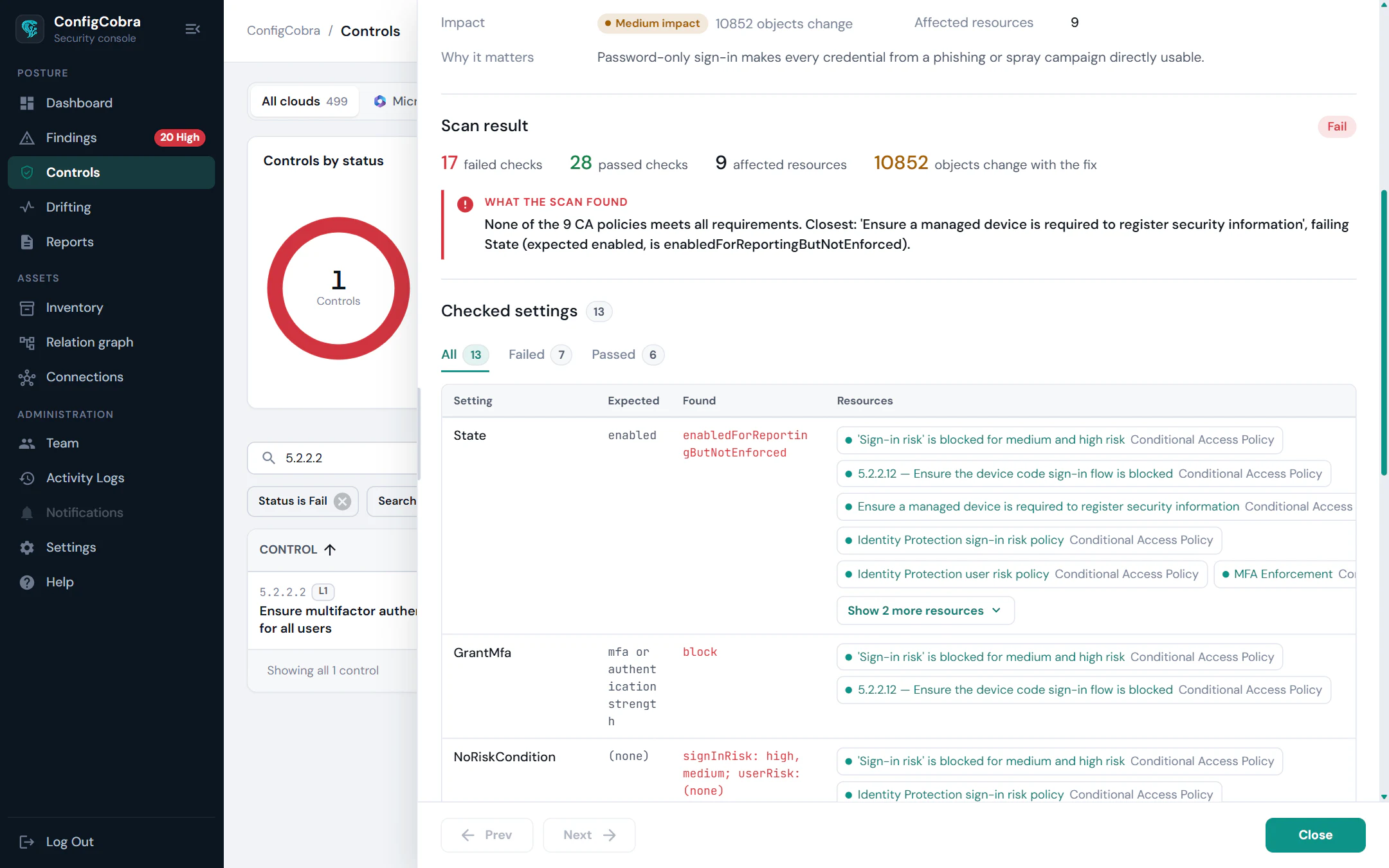
Impact
Know what a fix changes before you make it.
For a failing control, ConfigCobra lists the users, groups, mailboxes and apps the fix affects, with the effect on each and an impact level.
Remediation impact analysis →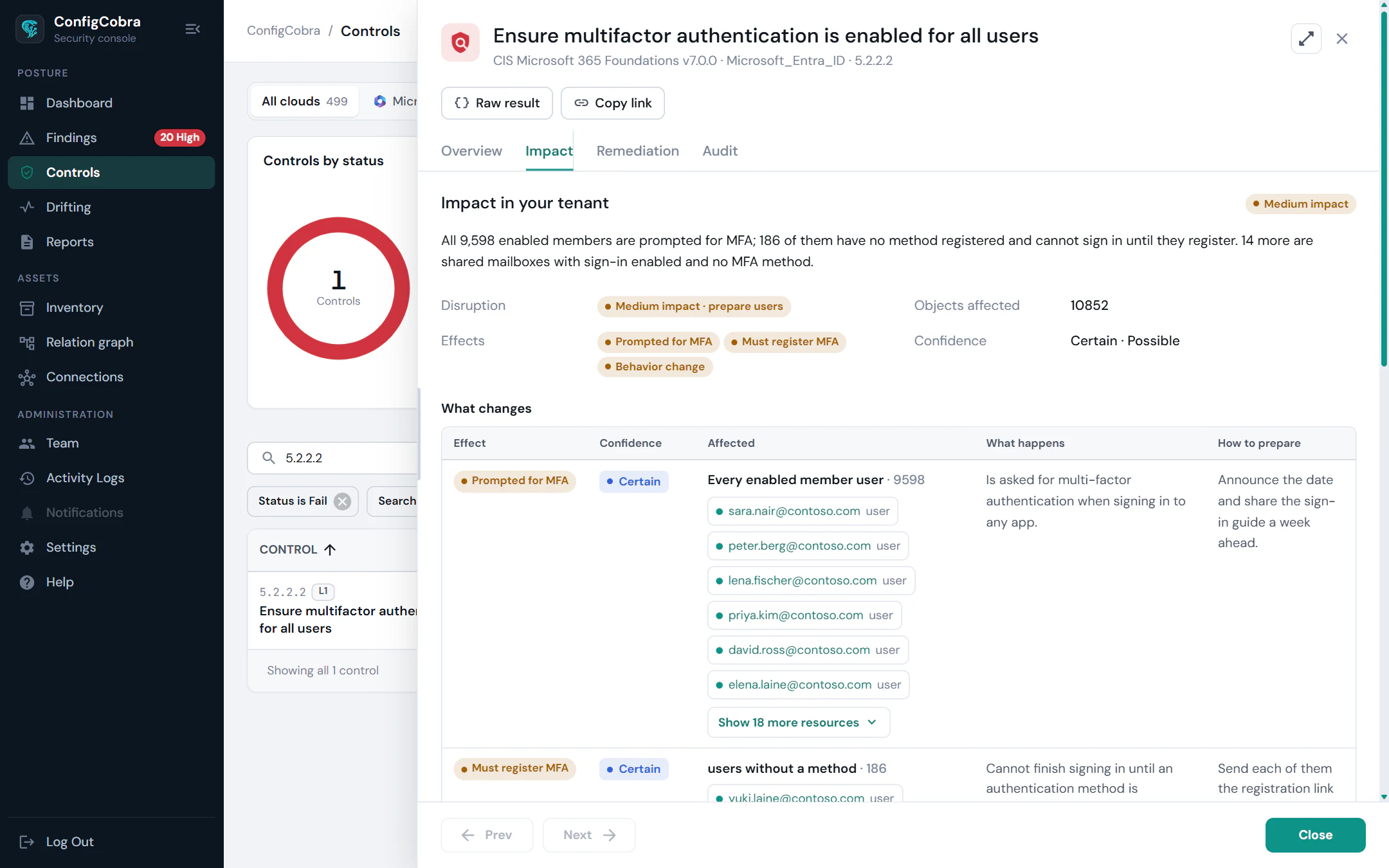
Inventory
Every object, and which ones are risky.
Users, guests, groups, devices, apps, mailboxes, sites and policies in one inventory, with built-in risk views and findings linked to each object.
Explore the inventory →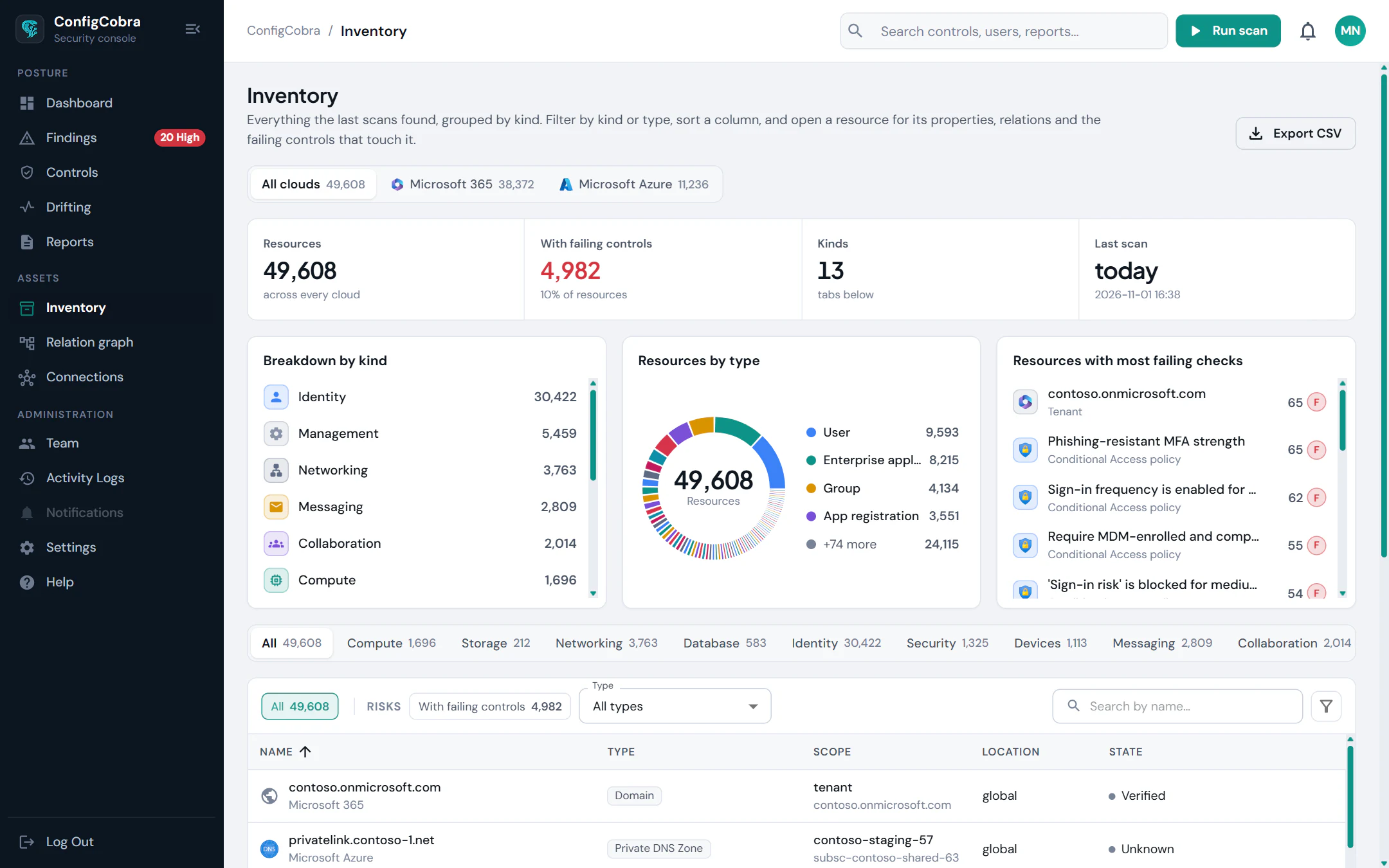
Read-only Microsoft Graph. No agents.
Assess subsidiaries or client tenants from one workspace, and invite auditors with a read-only seat.
- Microsoft Graph
Read-onlyTenant configuration is read through read-only Microsoft Graph permissions.
- Nothing to install
No agentsNo agents on devices or servers.
- Admin credentials
No passwordsNo admin password sharing.
Assess, see, fix, keep and prove.
Every module below runs on your Microsoft 365 tenant today.
- Assess
Cloud Security Posture Management (CSPM)
CIS benchmark assessment with a score, findings and a severity estimate per control
Learn more → - See
Inventory & Insights
Every user, app, device and resource in one inventory, with built-in risk views
Learn more → - Fix
Remediation
See what a fix changes in your tenant before you apply it, then use the generated script
Learn more → - Keep
Monitoring & Drift
Daily scans, drift detection and email alerts when a control regresses
Learn more → - Prove
Reports & Evidence
PDF reports with evidence and a timestamped snapshot, plus a read-only auditor seat
Learn more → - Ask
AI Assistant (MCP)
Ask your AI assistant about your posture, using live ConfigCobra scan data
Learn more →
One console for
- Microsoft 365160 CIS controls
- Microsoft Azure339 CIS controls
- Google Cloud93 CIS controls
- AWS306 CIS controls
- Google WorkspaceComing soon
Frequently asked questions
Which CIS benchmark does ConfigCobra check for Microsoft 365?
The CIS Microsoft 365 Foundations Benchmark v7.0.0 — 160 controls across 9 sections, with 114 Level 1 and 46 Level 2 controls. 143 of 160 controls are assessed automatically and 17 require manual verification.
What access does ConfigCobra need to my tenant?
Read-only Microsoft Graph permissions. There are no agents to install and no admin passwords to share, and ConfigCobra never changes your tenant.
How long does a scan take, and how often can it run?
Results arrive in 20–25 minutes. Every connected tenant is scanned automatically every day, you can start an ad hoc scan any time, and you are alerted by email when a control regresses.
Is there a free trial?
Yes. The free trial lasts 14 days with full access, including all 160 controls.
What is the Microsoft 365 inventory?
A view of your users, guests, admins, groups, devices, apps, mailboxes, SharePoint sites, policies, domains, licences and directory roles, with built-in risk views and findings linked to the objects they concern.
What is remediation impact analysis?
For a failing control, it shows what changes in your tenant if you apply the fix — before you apply it. It lists affected users, groups, mailboxes, apps and policies, with an impact level of High, Medium, Low or None.
See it on your own tenant
Read-only access — ConfigCobra never changes your tenant.